Issue 02 · Trainer managed Azure labs
Making AI my implementation minion
How I used AI in VS Code to help design a trainer managed Azure workshop while keeping authentication, tenant context, and execution under human control.
Published 25 September 2026
In short: I built a lab environment in my Azure tenant so refugees could access practical AI-901 labs. AI handled much of the implementation. I retained the authentication, validation, and decisions.
The shorter case study and public safety guide are available here (this is also a plug to my other project that I am working on):
Read the AI-901 refugee labs case study and public safety guide.
Context
As a Microsoft technical trainer, I have used hosted lab platforms such as Skillable. They solve a real problem: Learners receive a prepared environment, trainers can focus on delivery, provide a lab key, and the provider handles much of the operational work. I was there mostly to answer any IT support report like “have your turned the lab on and off” or “clicky this button” and showing them how the lab environment worked. After a while, it became an automated script that symbolised ground-hog day but I could rest my voice so often looked forward to those moments of quiet.
Microsoft wants scale when it funds projects. If you can impact thousands, yeah, that’s decent.. millions? Now we’re talking and they’ll secure funding for you. Why do you think I ended up being asked to record my trainings afterall? They saw the opportunity that a 30 class trainer could instead create material for a million class. But.. a Microsoft budget can also be difficult to access for a small initiative where the budget, lead time, or number of learners does not fit the usual route. This is usually where most of the expenses go towards.
A lab for 40 people (at the time of my project) ranged from 1200-1500 euros and even though there is budget, there’s also beaurocracy. These kinds of projects takes time and I was given 60 days to prepare it, and design the AI-masters bootcamp thinking I had this budget, when in reality: I learned in the first week that it was not like the 2025 bootcamp. I did not have the budget like the previous year. I had a trainer (shout out to Adriana Cabrera, MSc. for leading the workshops), a room (#dreamspace), refugees (thanks to NewDutchConnections) and me. And in my 4 week long panic, WHILE THE PROGRAM WAS GOING ON, I could not find ways to secure internal funding for the practical labs, coupons but I still wanted to work with Maud on the refugee learning initiative. It’s important to me. It’s important to us and we were going to run that workshop as close to the real training experience as possible. Both Adriana and I were a bit at odds and removing the hands on element did not feel like a good answer but trainers are resourceful and helpful creatures. Previously, our teams did cohacks which gave us access to a virtual machine for a lab.
So we come from our hobbitholes, ask from the highest hill for ideas and usually someone will answer back (thanks Michael Kenntenich) with an idea that they did in the past.
So what I did have what access to github copilot, and a microsoft 150 abhonement perk that they offer to all FTE employees at microsoft.. I also had a particular set of skills and I would find an answer, and I would.. ki-create an environment I could share it with them that did not expose me (*imagine Liam Neeson from Taken). So, my question became:
Could a trainer run a secure workshop in their own Azure space or a limited subscription, ideally for less than USD 100 depending on the number of learners and services required?
The first design supported 29 learner workspaces. It included temporary identities, controlled access, shared AI services, multilingual learner guidance, cost controls, and cleanup from the start.
AI helped me get there faster, but only because I kept a clear boundary between assistance and authority. I dreamed of what I wanted, designed the vision, authenticated my name, let AI do the architecting, adjusted and iterated and then tested the output as a user.
Genuinely because I trust my technical acuity, I can dream bigger now and do more. AI makes me a fast boi and does the implementation side of thing. If you don’t have programming skills, it’s trial and error. If you do.. well you know how it is. Now we clicky the button or run in the command prompt.
What I asked AI to do
I used AI in VS Code to turn the workshop requirements into an initial architecture and PowerShell implementation.
The useful work included:
- comparing a hosted lab with a trainer managed Azure environment
- identifying the Azure and Microsoft Graph operations required
- scaffolding repeatable deployment and cleanup scripts
- reviewing role assignments and resource scope
- challenging cost assumptions and idle charges
- identifying failure paths such as missing quota, regional availability, and delayed role propagation
- drafting learner and instructor guidance for human review
That is a broad contribution, but it is not permission to operate my cloud environment.
This was not one perfect prompt
The environment emerged through many smaller prompts, real deployment output, and corrections, somewhere around 62 prompts before I was happy.
The quotations below are lightly cleaned and stripped of tenant, subscription, account, resource, and learner details.
You can see more of my sanitised prompts here.
Start with the existing state
Act as a senior Azure Solutions Architect and PowerShell automation engineer. I have already created the Azure DevTest Lab. Do not recreate the lab. Build only the remaining components: policies, users, groups, RBAC, and the student VMs.
What worked: The prompt gave the AI a role, a clear boundary, and an existing resource it had to preserve. The first scripts focused on the missing components instead of rebuilding everything.
What changed: The original learner count was no longer correct, and the first configuration still reflected one specific environment.
Redesign prompt:
I want to create 30 VMs.
The final design used 29 learner workspaces and one trainer demo workspace. Configuration later moved into .env so environment values did not have to stay in reusable code.
Add the operational boundary
I also want to time restrict the labs to a maximum of two hours. Once that ends, they lose access to everything.
Can we create one Foundry account and one Search resource for the group so only one shared environment is deployed? I also want to hide all my other resource groups.
What worked: A single learner group became the access switch for the lab, Foundry, and Search. Shared services reduced duplication, and scoped roles limited what learners could see.
What did not work: The first time bound role design depended on Entra P2 or Identity Governance. The real tenant did not have that licence, so deployment fell back to permanent role assignments.
Redesign prompt from the deployment output:
The time bound grant failed because the tenant needs Entra P2, then it fell back to permanent access. What should change?
The correction kept the group based role model but added a managed identity runbook to stop VMs and remove workshop role assignments at the session end. Its report mode shows the intended changes before enforcement.
Test as a learner
I also want a test user for myself so I can see how the labs go. Add a demo account and VM.
What worked: This created a representative path for checking portal visibility, VM access, Foundry, Search, and the learning exercises without relying on my owner view.
What changed: The demo identity had to be an existing account supplied through private configuration. The reusable script now stops if that value is missing, or the trainer can explicitly skip the demo VM.
Things that needed to change was the git-ai-901 instructions use a key. I told them to carry on from step 4. They needed to use AI to convert that to a managed identity via code. Some students also struggled with signing into Azure.
Design for the people in the room
It will be an online virtual session, so the README needs to be easy to read and step by step for Turkish, Arabic, and refugee learners.
Make it as easy as possible for the learner.
From the perspective of a refugee whose English may be limited, what other considerations should I put in place?
What worked: These prompts changed the output from infrastructure only to a supported learner journey. The design added multilingual guidance, a glossary, reassurance, browser translation, read aloud support, copy and paste friendly steps, and Temporary Access Pass.
What needed more work: Temporary Access Pass codes cannot simply be read back later. Regenerating them also risked overwriting local handout state.
Redesign prompt:
Can you generate TAP codes without overwriting the existing learner state?
That produced a separate TAP only recovery path rather than rerunning the whole deployment.
Ask the AI to challenge its own answer
Evaluate the design from a security and infrastructure perspective. What considerations or policies are missing? Make changes where necessary.
Should I enable network isolation?
Anything else that may be problematic?
Am I ready to deploy? Are there any other considerations I should be aware of?
What worked: These questions exposed quota, regional availability, remote access, role scope, licensing, network design, credential handling, and cleanup before learners arrived.
What did not work: Some early advice treated an architecture choice as settled bnfore the actual lab region and connection route were confirmed. Asking follow up questions against the real portal configuration was more reliable than accepting a generic recommendation.
Use real failures as the next prompt
The deployment did not run perfectly from start to finish. I pasted the relevant error and asked for the smallest correction.
The Foundry project request failed because the parent account was still provisioning.
The script was changed to wait for the parent account before creating the project.
Model deployment failed, possibly because of region or quota. I will deploy the model manually. Update the documentation and tell me what to choose.
The model became an explicit manual fallback rather than a hidden partial failure.
The Search index failed, possibly because the role had not propagated. Can we alter the code so that existing resources do not need to be recreated or overwritten?
The deployment became safer to rerun. Existing users, groups, role assignments, policies, shared services, and VMs were checked before creation.
VM deployment failed during template parameter serialization.
After the parameter shape was corrected, ARM validation passed and the same deployment was restarted. Completed setup was reused while VM creation continued.
Separate configuration from code
Where possible, can I have a
.envfile for the configuration settings?
What worked: This separated tenant and workshop values from reusable logic.
What needed redesign for publication: The working copy still had live fallback defaults. In the reusable example, required values are placeholders, missing configuration fails closed, and the local scripts do not authenticate or select a subscription.
The result was not “prompt in, platform out”. It was closer to requirements gathering, design review, implementation, testing, and troubleshooting with AI present throughout.
How I tested the setup
Testing happened in layers rather than through one final success message.
- I asked for a walkthrough of the deployment script before running it and checked each region against the intended architecture.
- I ran the real deployment, returned the exact failing output to the AI, changed one problem at a time, and reran the same path.
- I used idempotent checks so completed identities, roles, policies, and resources were reused during reruns instead of duplicated.
- I created a trainer demo identity and VM to test the representative learner view, including resource visibility, connection, Foundry, Search, and the learning material.
- I used report and preview modes for session cutoff and cleanup so destructive actions could be inspected before execution.
- I checked generated summaries and handout files locally, while keeping passwords, TAP codes, endpoints, and learner data out of source control.
- For the publication example, I ran a separate read only readiness check against my selected Azure context. It confirmed authentication state, subscription selection, and resource group visibility without creating or changing resources.
The recovered conversation proves that I ran into licensing, provisioning, role propagation, model deployment, template serialization, and credential recovery problems. It does not justify pretending every planned learner check produced a retained test log. Where evidence was not safe or useful to retain, I describe the test method rather than claim a result I cannot show.
Scrubbed deployment assets
The public example includes the credited deployment scripts and deployment guide. They contain placeholders rather than my tenant, subscription, account, resource, learner, credential, endpoint, or output values.
The guide lists prerequisites, a safe prompt for cloned copies, separate Azure and Graph authentication, private configuration, staged deployment, representative learner testing, timeout reporting, and preview first cleanup. The scripts are supporting examples, not a promise that another tenant has the same permissions, quota, policies, region support, or organisational approval.
The authentication boundary
The generated script does not sign me in. It does not contain a tenant ID, subscription ID, password, token, device code, or exported Azure context.
I authenticate separately in my own terminal:
Connect-AzAccount
Set-AzContext -Subscription '<selected privately in the terminal>'
Only after I have selected the intended subscription do I run the generated script.
The public preflight begins by checking for an existing context. If none exists, it stops:
$context = Get-AzContext -ErrorAction SilentlyContinue

if (-not $context -or -not $context.Account -or -not $context.Subscription) {
    throw 'No Azure context is selected. Authenticate interactively in your terminal first.'
}
I ran this pattern against my own Azure subscription. The public evidence records only what is needed to prove the workflow:
Authentication          : Interactive user context present
AzureEnvironment        : AzureCloud
SelectedSubscription    : True
AccessibleSubscriptions : 1
ResourceGroupsVisible   : 17
Operation               : Read only preflight; no resources created or changed
It does not publish account names, tenant IDs, subscription IDs, resource names, credentials, or tokens.
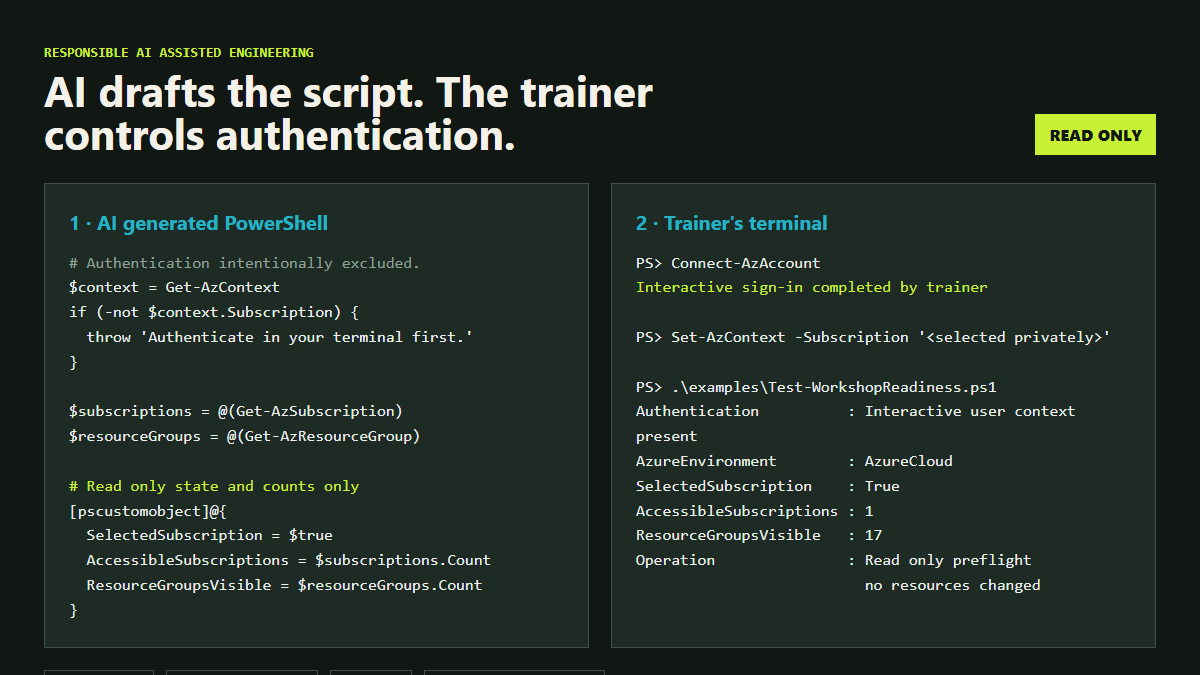
This is the distinction I want other trainers to see:
The AI can suggest the commands. The person operating the environment must understand the scope, authenticate directly, review the plan, and own the result.
Why I did not let the script authenticate
Putting authentication inside generated automation makes several unsafe shortcuts more tempting.
Credentials can end up in source files, chat history, terminal logs, screenshots, generated output, or version control. A script can also reuse an existing context without making it obvious which subscription is active.
Keeping authentication separate creates a deliberate pause:
- I sign in through the supported interactive flow.
- I select the subscription in my terminal.
- I run a read only check.
- I inspect what the script plans to create or change.
- I execute only after the scope makes sense.
- I validate using a learner account rather than relying on my owner view.
- I preview cleanup before deleting anything.
The pause is a feature. Fast generation is useful. Fast execution without understanding is not.
What trainers should consider before inviting learners
Ive designed this next component for trainers who want to run the lab.
A trainer managed lab transfers work and responsibility from the hosted provider to the trainer. It is not simply a cheaper collection of virtual machines. Technically it is but you can design it knowing what a learner goes through as a lab instructor.
If you want to use this with copilot: clone/ fork the repo and use this prompt
I cloned Victoria Eshelby’s trainer managed Azure lab example. Act as a senior Azure solutions architect and PowerShell reviewer. My goal is to prepare an AI-901 workshop for [number] learners in [region], running from [start time and time zone] to [end time and time zone]. The DevTest Lab [already exists / still needs to be created separately]. My target budget is [amount and currency]. Read
examples/trainer-managed-azure-lab/index.md,examples/trainer-managed-azure-lab/workshop.env.example, and the five PowerShell scripts before recommending changes. Do not authenticate, run deployment or cleanup, change my Azure context, create resources, grant permissions, or request secrets. I will authenticate and select the subscription separately in my own terminal. Once the go checklist has been approved, provide the commands for me to review and run in my own terminal. First:
- Identify missing prerequisites, assumptions, security risks, licensing needs, quota checks, and likely cost drivers.
- Tell me which
.envsettings I must complete locally. Use placeholders in chat rather than my real values.- Check whether the proposed learner count, region, VM size, Foundry model, Search tier, identity model, network route, session cutoff, and cleanup plan fit together.
- Explain each script and the resources or identities it can change.
- Propose a staged validation plan that starts without VMs or shared AI resources, then tests one representative learner journey before scaling.
- Include checks for least privilege, unrelated resource visibility, accessibility, generated credential handling, idempotent reruns, timeout report mode, and preview first cleanup.
- Stop before every command that could create, modify, or delete Azure or Entra resources. Wait for my explicit approval and show me how I can verify the result myself. End with a go or no go checklist. Mark anything that cannot be verified from the repository as requiring human confirmation.
1. Environment boundary
Prefer a dedicated training tenant and subscription. If that is not possible, isolate the workshop and confirm that learners cannot enumerate unrelated resources. Thanks to the content team at Microsoft, I have learned how important it is to restrict access through policies and Security group restrictions. IT IS SO IMPORTANT!
2. Identity lifecycle
Decide whether learners need guest or temporary member accounts. Avoid shared identities. Plan creation, sign in, expiry, session revocation, and deletion before the workshop begins. Note: Expiry only works on enterprise accounts but if you are lucky to have that… USE IT.
3. Permission scope
Grant the smallest role at the smallest resource scope. Azure management permissions and service data permissions are not always the same, so test both.
4. Credentials
Prefer Entra authentication and managed identities over keys. Do not place credentials in chat, scripts, screenshots, or repositories. Delete temporary handout files after use. TAP > passwords where possible.
5. Cost
Model compute, disks, model usage, networking, and services that continue charging while idle. Set a budget, restrict allowed sizes, schedule shutdown, and design the environment for deletion.
The target of less than USD 100 is not a universal promise. It depends on cohort size, duration, region, service choice, and how quickly resources are removed. With the scripts I share, you can ask github copilot to adjust it.
6. Network exposure
Review public IP addresses, remote access, firewall rules, and downloaded connection files. A short workshop does not make an open endpoint safe.
7. Learner safety and accessibility
Use synthetic or approved sample data. Collect no unnecessary personal information. Provide language, readability, keyboard, and support options. Review examples carefully when working with vulnerable audiences.
8. Validation
Test the complete journey through a representative learner account. Owner access can hide exactly the permission and visibility problems that learners will experience.
9. Teardown
Inventory everything the workshop creates. Remove role assignments and identities, delete chargeable resources, retain only the evidence you need, and verify that learner data and credentials do not remain locally.
10. Organisational approval
Technical isolation does not mean organisational approval. Check security, privacy, acceptable use, procurement, and safeguarding requirements before inviting external users.
What AI could not decide for me
AI could compare options, but it could not accept the risk on my behalf.
I still had to decide:
- whether the subscription was appropriate for external learners
- which permissions were justified by the exercises
- whether a service was available and affordable in the chosen region
- what learner support and accessibility looked like
- which generated suggestions were valid in the real Azure environment
- when the deployment was safe to run
- whether the workshop should proceed at all
Those decisions needed the project context, the learner context, and a human who remained accountable after the chat ended.
What I am doing next
For the remainder of FY27, I am ready to help with more workshops where I can safely provide temporary learner access.
I also want to make this approach reusable for trainers who need to run a practical session without waiting for a large lab engagement. That means improving the safe defaults, testing different cohort sizes, documenting the true cost, and keeping authentication and approval with the person operating the environment. If you are a technical trainer, please share your feedback with me.